| Resolution | Running HeavyBid for the First Time
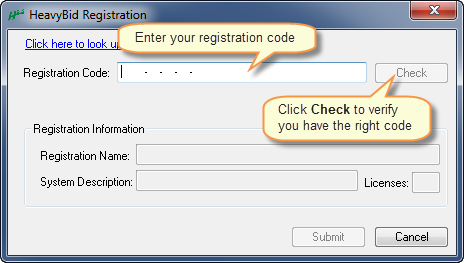
- When first attempting to launch HeavyBid, a prompt will appear for the company specific registration code.
- Copy and paste the registration code into the field, then click Check to verify that the code entered is valid.
- Check that the registration information displayed is correct and click Submit.
Standalone Systems
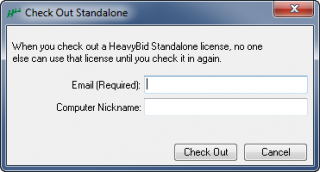
- Specific to Standalone systems, a prompt to check out a license will also appear the first time HeavyBid is run.
- Enter an email address, and (optional) enter in a nickname for the computer in use (HeavyBid will default to the computer name).
- Note: The email and computer nickname are for personal information only. Through the HCSS credentials website, the company administrator can see who has each standalone license checked out. Use a nickname if estimators use multiple computers such as a desktop in the office and a laptop for travel.
- Click Check Out.
Related Articles:
Where to find HeavyBid Registration CodesHow to Find/Look Up HCSS Registration Codes |
|
|---|

