Note: Integration with the Richardson Construction Estimating Standards requires the purchase of a Richardson estimating book from HCSS. Once purchased and activated, the following can be performed.
Assigning the License(s):
- Navigate to Menu > Tools > Richardson > Assign Richardson Licenses.
- Totals for Licenses Owned, Licenses Assigned, and Licenses Available are displayed in the top portion of the screen.
- Users/License assignment is displayed in the bottom portion of the screen.
- Select the check box beside the desired user(s).
- Click Close to save the license assignment(s).
Download the Latest Richardson Data:
- Navigate to Menu > Tools > Richardson > Download Latest Richardson Update.
- A popup box will display on screen. Once the box disappears and the update finishes, the estimating book is ready for use.
Using Activities from the Richardson Estimating Book:
- With an existing biditem selected, click the 3 dot ellipsis in the Activity field.
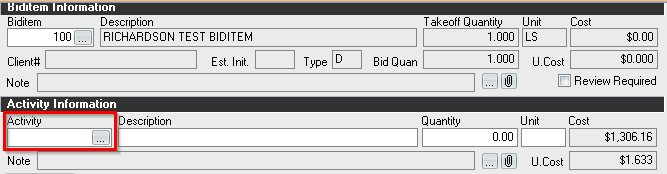
- Expand the section for Richardson and navigate to the desired activities to add.
- Select the check box beside each desired activity to add and click OK.
Using Resources from the Richardson Estimating Book:
- With an existing activity selected, click the Resource column header.
- Expand the section for Richardson and navigate to the desired resource(s) to add.
- Select the check box beside each desired resource to add and click OK.

