| Resolution | Accessing Child Biditem Pricing:
- Navigate to Menu > Summary > Pricing.
- Locate and right-click on a parent biditem, then click Price Child Biditems.
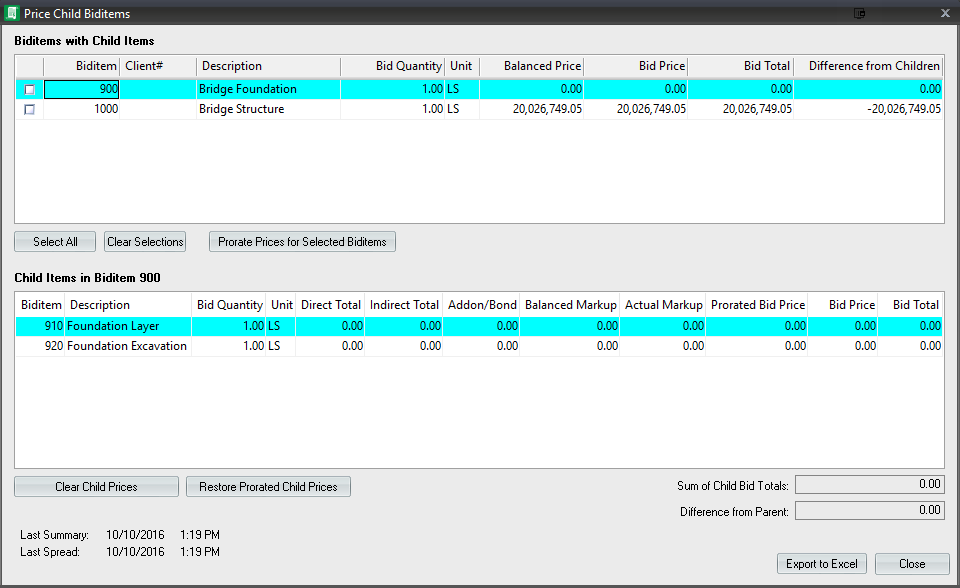
- The resulting screen is sub-divided into two halves. The top half, which contains all Biditems with Child Items, and the bottom half, which displays the child items for the biditem clicked on in the top portion.
Manually Enter Child Pricing:
- From the Price Child Biditems screen, click to select the desired parent item from the top portion of the screen.
- Populate the Bid Price column for the child biditems in the bottom portion of the screen.
- As prices are entered for child biditems, the Difference from Children column (top section) for the associated parent item will re-calculate to display the current variance in pricing.
Prorate Child Pricing:
- From the Price Child Biditems screen, select the check box beside one or more parent biditems (top section).
- Click Prorate Prices for Selected Biditems to automatically allocate child pricing.
Note: Changing pricing for child biditems does not change the pricing for the associated parent biditems.
Options:
- Clear Child Prices - Click to reset all child bid prices to zero.
- Restore Prorated Child Prices - Click to restore prorated child prices if changes to child bid pricing were made after prorating prices.
- Export to Excel - Click to export child biditem pricing data to Excel.
|
|
|---|

