Before closing files on the server, do the following:
- Make sure all users are out of the affected program (HeavyBid, HeavyJob, etc)
- Be 100% sure that the files being closed are not in use
- Consult with IT before closing locked files
Closing active files can cause significant data corruption and/or data loss.
- Remote in to the file server that's hosting the files which need to be closed.
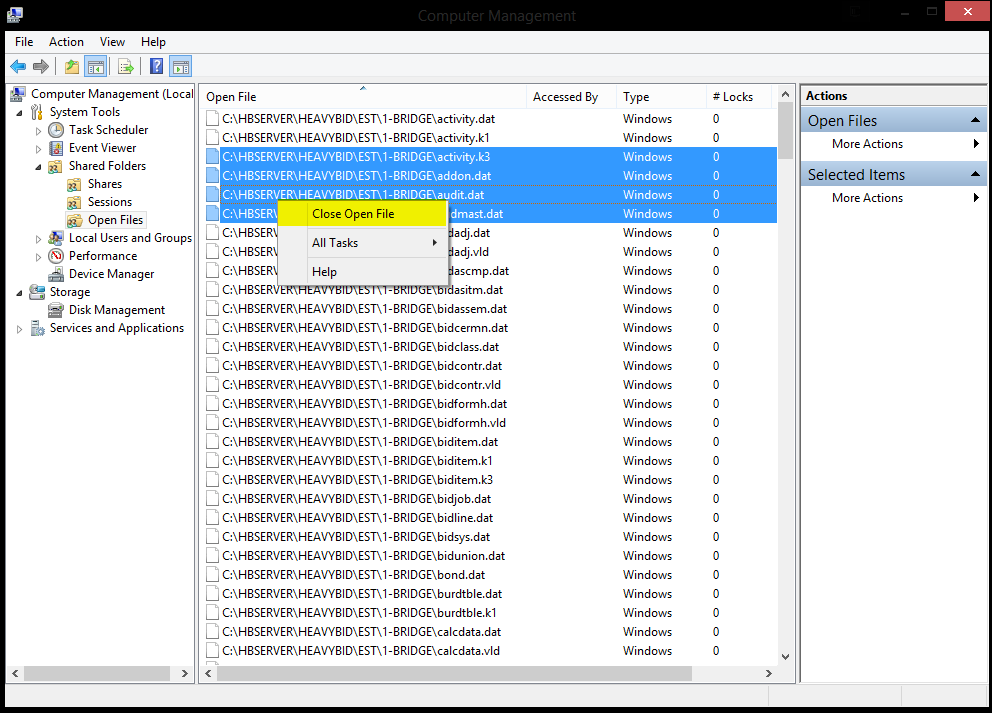
- On the file server, open Computer Management.
- Navigate to System Tools > Shared Folders > Open Files.
- Locate any file under Open Files that contains the affected program in the file path. (i.e. HeavyBid, HeavyJob)
- Click to highlight desired items. Then right-click and select Close Open Files.
- Click, hold shift, and click again to select several items in order.
- Click, hold ctrl, and click again to pick and choose various items.
 Note:
Note: If after performing all the above steps a file remains and persists after attempting to manually close, a reboot of the server may be necessary.

